AI TOOL / #08846
Copy for Chat GPT
An extension used to copy ChatGPT responses and check for plagiarism.
Introduction
Extension to copy ChatGPT responses and check for plagiarism.
What is the Plagiarism Detector Extension for Chrome – an extension/plug-in for Google Chrome?
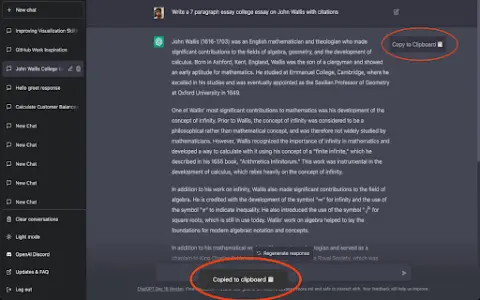
This extension allows you to copy the responses generated by ChatGPT by clicking a button or using the CMD+K shortcut key, and then have those responses checked by plagiarism detection tools.
How to use the Plagiarism Detector Extension for Chrome?
You can use this extension by clicking the copy button on ChatGPT’s response or by pressing CMD+K. The copied text will be automatically checked to determine whether it contains any plagiarized content.
The core functionality of the Plagiarism Detector Extension for Chrome.
One-click to copy the response from ChatGPT
Use the CMD+K shortcut key to copy.
Automatic plagiarism detection
Related
SubCap Genie
An AI-powered video editing web application used for adding subtitles, performing translations, and optimizing videos.
AI Image to Captions Generator
An AI-powered application designed to generate photo captions.
Wedding Hashtag AI
AI tools generate creative and personalized wedding topic tags.
Devi | AI Social Media Leads Monitoring and Outreach Tool
AI tools for social media lead monitoring, outreach and content scheduling.
Bizfly Chatbot AI
Bizfly’s chatbot AI simplifies the process of sending messages on Facebook fan pages and integrates seamlessly with the Bizfly ecosystem.
Leasey Connect
Automatically post rental listings on the Facebook Marketplace and ensure immediate responses 24/7.