AI TOOL / #06948
ImagePrompt – Reverse Image To Prompt
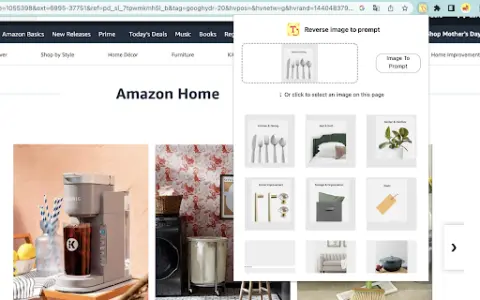
ImagePrompt converts images into text prompts and extracts images from web pages.
Introduction
ImagePrompt converts images to text prompts and extracts images from web pages.
What is ImagePrompt ai chrome extension/plugin?
The ImagePrompt extension allows users to enter any image and convert it into a text prompt. It can also extract all images from web pages and generate tips for them. It's designed for content creators, designers, and anyone who needs to provide textual descriptions for visual content. It helps generate titles, alt text, tags, analyze visual elements, explore hidden meanings, and create hints for image generation tools like MidJourney, Stable Diffusion or DALL·E 2.
How to use ImagePrompt ai chrome extension/plugin?
In just a few clicks, enter an image to convert it into a prompt. Alternatively, extract all images from a web page and generate a hint for each image.
ImagePrompt ai chrome extension/plugin core functionality
Reverse convert any image into a text prompt
Extract and analyze images from any web page
Save and share tips
Related
Tobira
A sales intelligence agent that handles AI-generated traffic for websites
Yuankong AI Work
An end-side-operated AI office platform that covers all scenarios.
Study Slay
Turn the lecture slides into flashcard quizzes
Motion Fab
Chat-generated dynamic graphic videos
A domestic 3A masterpiece from Jimao
The highly popular first-person shooting game, which consists of just one 1.4MB file. No installation or internet connection is required – simply download the HTML file and double-click to start playing. The scenes, sound effects, and textures are generated in real-time using code. The game includes a complete set of mission procedures, realistic shooting feedback, and an atmospheric setting that captures the feel of a rainy night in a port area.
QuotedPart
AI quotation software used by CNC and sheet metal factories