AI TOOL / #06744
ZumaPiano
An AI-powered Chrome extension designed for learning the piano, offering personalized learning guides.
Introduction
AI-powered Chrome extension for learning piano with tailored learning guides.
What is the ZumaPiano Chrome extension/plug-in?
ZumaPiano is an AI-powered Chrome browser extension that completely changes the way you learn the piano. It allows you to play any piece of music by instantly converting it into a customized learning guide tailored specifically for your needs. ZumaPiano simplifies and enhances your piano-learning experience, eliminating the need for endless tutorials and lengthy practice sessions.
How to use the ZumaPiano Chrome extension/plug-in?
1. Select a piano solo piece from any website.
2. Record this song by launching the ZumaPiano Chrome extension and clicking on “Record”.
3. Once the recording is stopped, ZumaPiano will process the audio and generate a guide. Click “Practice” in the extension to view the piano score.
The core functions of the ZumaPiano extension for Chrome.
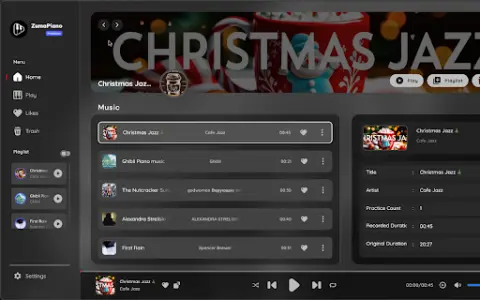
Enhance your personal music collection: Personalize your playlist by adding favorite tracks and editing their titles, artists, and accompanying images; also, manage or restore any songs that you have deleted.
Practice Playlist: Create a playlist from your music collection to enable customized practice sessions.
Flexible learning mode: You can choose between the practice mode that allows only audio sampling or the mode that enables visual note playback.
Advanced playback options: Allow you to adjust the playback speed, control the volume, set loop settings, and enable automatic playback, all of which help optimize your practice experience.
Customizable note display: You can switch the way note names are displayed according to your personal preferences, thus enjoying a learning experience that is tailored specifically to you.
Related
Mianfeisms proxy connection
Receive text messages for free online and get access to free phone numbers (www.mianfeisms.xyz) to receive messages from countries such as China, the United States, and the United Kingdom. You can register for our APP or create an account using one of our free phone numbers.
Loomi
An AI content creation platform that integrates the capabilities of multiple models
Vibrantsnap
Turn a screen recording into a product demonstration video with just one click.
PixEditor AI
An online AI image editor that allows users to modify images with just one sentence.
Dimly AI
Automatically convert songs into AI-generated music videos
Relax-Game-Toolkit
A collection of pure-front-end, dependency-free mini-games – a single HTML file contains approximately 20 games and relaxation tools, such as the electronic wooden fish game, 2048, Snake, Minesweeper, and more. After downloading the index.html file (about 315KB), double-click it to play in any browser. These games are compatible with mobile touchscreens and support local storage of game saves.