AI TOOL / #06632
Talk to GPT
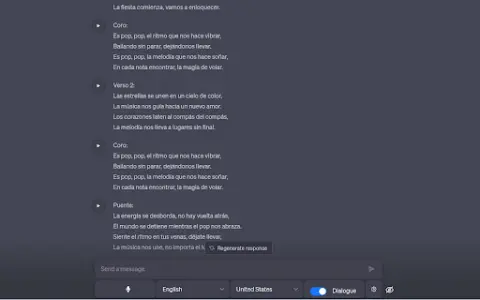
A Chrome extension designed for voice interaction with ChatGPT, supporting multiple languages and error correction features.
Introduction
Chrome extension for voice interaction with ChatGPT, supporting multiple languages and error correction.
What is the Talk to GPT AI Chrome extension/plug-in?
“Dialogue with GPT” is a Chrome extension that enables users to interact with ChatGPT on chat.openai.com via their microphone. It utilizes the browser’s speech recognition API to convert spoken audio into text and supports multiple languages. Users can also adjust the language settings and enable ChatGPT’s error-correction functionality.
How to use the Talk to GPT AI Chrome extension/plug-in?
Install the Talk to GPT Chrome extension. Visit chat.openai.com and use your microphone to utter your query. This extension will transcribe your voice and send it to ChatGPT.
The core functionality of the GPT AI Chrome extension/plug-in.
Provide voice input for ChatGPT.
Multi-language support
Language level adjustment
ChatGPT corrects errors.
Related
Poly ai ai
PolyAI offers realistic voice AI assistants, 24/7 customer service, and no human agents.
CPAIT app
AI applications for Chinese pronunciation improvement, providing immediate feedback to help enhance the accuracy of Mandarin pronunciation.
Speechy
Speechy uses artificial intelligence to provide feedback and suggestions aimed at improving spoken English.
Vocha | Voice for ChatGPT
Vocha is a voice input extension specifically designed for ChatGPT, with an emphasis on privacy and ease of use.
seasalt.ai
A conversational experience platform that combines generative artificial intelligence and speech recognition.
Serenade for Chrome
A voice-controlled tool for coding and web navigation.