AI TOOL / #05985
Voiceboost – ChatGPT
A Chrome extension designed for voice-controlled interaction with ChatGPT.
Introduction
Chrome extension for voice-controlled ChatGPT interaction.
What is the Voiceboost AI Chrome extension/plug-in?
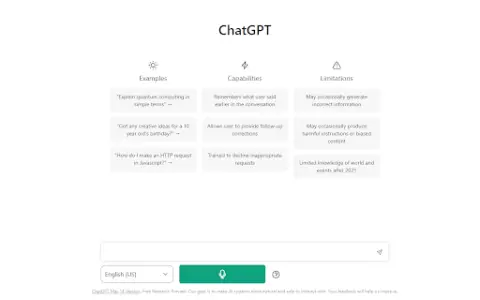
Voiceboost is a Chrome extension that allows users to interact with ChatGPT via voice commands. It adds a button below the input field; by clicking this button, the system captures the user’s verbal inquiries and sends them to ChatGPT for responses. This provides a hands-free alternative for entering text.
How to use the Voiceboost AI Chrome extension/plug-in?
Click the button added below the input area to start recording your voice input. Alternatively, use the keyboard shortcuts: Ctrl+Shift+S (Windows) or Command+Shift+S (Mac) to begin recording, and Ctrl+Shift+E (Windows) or Command+Shift+E (Mac) to stop and submit the recording. Make sure to grant microphone access when prompted.
The core functionality of the Voiceboost AI Chrome extension/plugin
Voice input for ChatGPT
Keyboard shortcuts for voice capture and submission
Related
Pedagogue AI
Gamified micro-learning applications designed for the retraining of artificial intelligence systems, aiming to enhance the productivity and profitability of small and medium-sized enterprises.
MaxLearn Microlearning Platform
MaxLearn is an AI-driven microlearning platform for creating, delivering, and validating corporate training courses.
Duomly – Interact, Engage and Learn!
Duomly is an online school that offers interactive micro-courses designed to help with skill development.
Build Club
A community and training platform that provides AI developers with opportunities to learn, build projects, and generate income.
StudyRaid
An AI-driven platform designed for creating and personalized learning experiences, which includes quizzes and examinations.
WorkRamp LMS
A full-featured LMS, suitable for training employees, partners, and customers, and equipped with AI-powered features.