AI TOOL / #05336
Legal Red Flag Detector
A Chrome extension that uses AI to identify potentially problematic elements in legal documents.
Introduction
Chrome extension that uses AI to detect red flags in legal documents.
What is the Legal RedFlag Detector AI Chrome extension/plug-in?
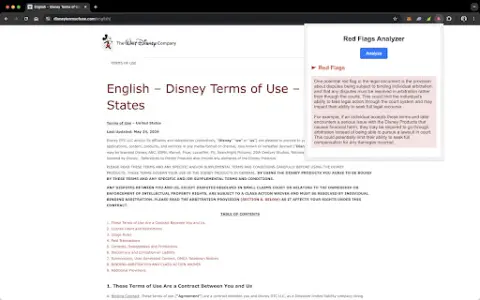
The Legal Red Flags Detector is a Chrome extension designed to identify potential red flags in legal documents, such as terms of service, privacy policies, and user agreements. It utilizes AI technology to highlight clauses that may be harmful to users and provides clear explanations, eliminating the need for legal expertise.
How to use the Legal RedFlag Detector AI Chrome extension/plug-in?
Install the extension, open the web page containing the legal document, and click “Analyze” in the pop-up window. This will display highlighted sections marked with red flags, along with simple explanations.
The core functionality of the Legal RedFlag Detector AI Chrome extension/plugin
Automatic analysis of legal documents
Prominent clauses regarding potential issues
A popular explanation of the red flag
Intuitive interface in the pop-up window
Related
CPU Performance Ranking Chart
The desktop CPU performance comparison chart, provided by Fast Technology, ranks the performances of both Intel and AMD CPUs in ascending order, allowing for a clear and intuitive comparison of their respective capabilities.
Law Master
Law Master is a free online legal consultation website. After taking a look, there is indeed no sign of any charges. If you have any legal issues, just ask directly and a professional will respond. Whether you encounter problems or have questions, you can go to the website for consultation: https://www.lvdashi
Viewing China with hundreds of billions of pixels
At 16:38:58 on October 12, 2024, this website became inaccessible. Our site only contains introductory articles. The “Viewing China in Billions of Pixels” website enables users to view panoramic images of cities magnified tens of thousands of times, allowing them to experience Chinese cities online, discover their unique features, and gain a better understanding of Chinese culture.
Marco Pineapple
Marco Pineapple — Marco Pineapple macbl is a website focused on Mac app downloads and a must-visit for Mac users. The site is clean and ad-free; no registration or login is required, and all Mac apps can be downloaded directly for free! Every app author provides a detailed introduction.
Focus on Win10.
“Focus on Win10” is an optimized version of Windows 10 developed by the author of “Kiss Your Wife”. It is based on the latest official version of Windows 10 and has been carefully streamlined, optimized, and enhanced to make the Windows 10 system more user-friendly. The author offers two different versions of this optimization package for Windows 10.
Thanh To
Clear Images is an online tool that makes blurry images clear based on deep learning techniques. The operation is relatively simple, the processing speed is fast, and there are functions such as matting, ID photo, text dubbing, etc. (Tools start charging, check in every day to get free watermark-free processing times) "Clear Map" is based on leading deep learning technology