AI TOOL / #04214
Spot AI
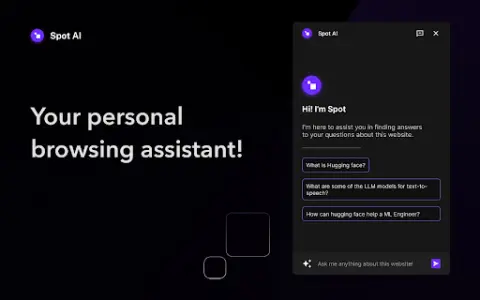
Spot AI reads web pages to answer your questions.
Introduction
Spot AI reads webpages to answer your questions.
What is the Spot AI Chrome extension/plug-in?
Spot AI is a browsing assistant that can read web content and answer questions based on that information. It enables users to easily conduct research and obtain information. It is available as an extension for Chrome and is also compatible with Brave and Arc browsers. Once installed, it can be activated by using the CMD/CTRL + K shortcut key.
How to use the Spot AI Chrome extension/plug-in?
Install the Spot AI extension in Chrome, Brave, or Arc. After installation, activate it by using CMD/CTRL + K. For the best experience, fix the extension in your browser. Then, pose your question, and Spot AI will read the relevant text on the web page to provide you with an answer.
The core functions of the Spot AI Chrome extension/plug-in
Read a web page and answer questions based on its content.
Compatible with Chrome, Brave, and Arc browsers.
Launch it by pressing CMD/CTRL + K.
Related
Kvery.io
An AI-powered SQL editor for database management and automation.
Sequel
An AI-based business intelligence platform that uses natural language to query and analyze databases.
GPT Spreadsheets Visualization
A tool that uses LLMs and code generation to create data visualizations and information diagrams.
Ultimaps
Map visualization tools enable the creation of interactive and customized maps based on data or provided guidelines.
CalcGen AI
An AI-powered platform for creating interactive charts, graphs, calculators, and data visualizations.
MailMentor | Sales Copilot
A sales assistant for personalized outreach messages.