AI TOOL / #04208
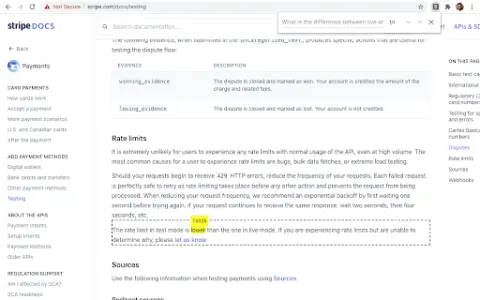
Shift-Ctrl-F: Semantic Search for the Browser
A Chrome extension that uses MobileBERT to search for and highlight answers on web pages.
Introduction
Chrome extension using MobileBERT to search and highlight answers on webpages.
What is the Shift-Ctrl-F Chrome extension/plugin?
Shift-Ctrl-F is a Chrome extension that utilizes the MobileBERT model, which has been fine-tuned using the SQuAD dataset. This extension uses TensorFlowJS to search for answers on web pages and identify relevant elements. It allows users to enter natural-language queries and find corresponding answers within the content of the current page.
How to use the Shift-Ctrl-F Chrome extension/plugin?
1) Open the extension pop-up window using the toolbar or shortcut key (Shift-Ctrl-F).
2) Enter your natural language query in the search box.
3) Press Enter and wait for the model to return the results.
The core functionality of the Shift-Ctrl-F Chrome extension/plug-in.
Conduct natural language question-and-answer interactions on web pages.
Highlight relevant elements based on the search query.
Efficient processing using MobileBERT
Related
Lummi
AI libraries containing images, illustrations, and 3D assets that can be used for creative projects.
RushTix
An interactive live streaming platform driven by AI, designed for collaborative story creation in real time.
Vozard
AI-powered voice modification software, used for real-time as well as file-based sound adjustments.
Ghibli Style Image Transformer
The AI platform converts images into artistic works in the Ghibli style.
ChatIMG
An AI image generator dedicated to transforming images in the style of Hayao Miyazaki, utilizing ChatGPT 4o technology.
niji・journey
An AI-powered mobile app designed to create custom anime illustrations based on text and images.