AI Card Bao DASH.AICARDBAO.COM
Home / #development tools / Favicon Generator (PixPix)
AI TOOL / #01216

Favicon Generator (PixPix)

Complete set of website icons, packaged together
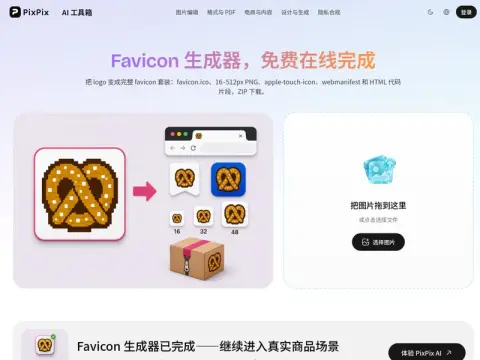
Introduction

Insert a logo and export a complete set of icon files for use on various browsers and devices. Then compress them into a ZIP file.

  • favicon.ico— Traditional entry point; older browsers can recognize it.
  • 16 / 32 / 48 px PNG —— Tab pages, bookmark bars, taskbars
  • 180 px —— iOS 的 apple-touch-icon
  • 192 / 512 pixels —— Android and PWA apps
  • site.webmanifest— The list that is displayed when added to the home screen
  • Once you have prepared the link tag text and ensured that all path attributes are correct, simply copy it into the `<head>` section of your HTML code.

What really deserves our attention are those two preview images with sizes of 16px and 32px. On the design mockup, the Logo appears clear and distinct; however, when reduced to a size of 16 pixels, it often turns into a blurred mass of colors—fine lines disappear, elements stick together, and the text becomes completely unreadable. And it is in this reduced size that users see the image on their browser tabs.

Therefore, when selecting an image source, it is preferable to choose square shapes with clear contours and minimal details. Logos that display the full company name in a horizontal format generally cannot be directly used as favicons; instead, it is usually necessary to extract only the visual elements of the logo or its initial letters to create a new design for use as a favicon. The fact that a design looks good at larger sizes does not necessarily mean it will be easily recognizable when reduced in size. This is the only criterion that must always be kept in mind when creating favicons.

Visits:100 Updated:2026-11-23 Popular tools

Related

Easy-to-search websites – an efficient way to find what you need online Yisou Site is a web data search engine that can help you efficiently locate high-quality websites. It is an essential tool for promotional and operational purposes, offering features such as quick filtering of SEO-friendly sites, analysis of competitors in the same industry, recommendations for similar websites, queries related to sub-sites, and comparison of website traffic data. For ordinary users, it can serve as a useful alternative to other traditional methods. Liber3 Liber3 is an e-book search engine that uses IPFS for downloads. Although its selection of resources can't compare with Zlibrary, most common e-books can basically be found and downloaded. Its advantage is that the website is simple and easy to use—searching and downloading are easy, and you can download in just a couple of clicks! 1. Open the website and... Source repository Source Repository: This website serves as the source repository for both the Reading APP and the Dimensional Comics APP. Recently, it has also added TVbox video resources, as well as book materials from the “Search for Books” platform. It contains thousands of novel resources from the Reading APP and hundreds of comic images from various Dimensional Comics APPs. Reading APP: This is an open-source application. Sima Yue SmartRead is an AI-based document reading and analysis tool that utilizes artificial intelligence technology and intelligent document processing methods to quickly extract information from complex documents. Through interactive chat sessions, it enables users to obtain critical information and insights in a precise and flexible manner, significantly reducing the time required for document reading and information retrieval. Little Bunny Calligraphy Copybook Tuxiaoguai Copybook is a free online children's copybook generator. Parents can generate copybooks online based on their child's age, and the tool supports direct printing on A4 paper. It covers Chinese character copybooks, pinyin copybooks, number copybooks, Chinese-style copybooks, and more, and also supports settings for font, font size, format, color, and more. AI-generated paintings "Dream Creation Diary" is a WeChat mini-program that uses AI technology for painting. With just a simple description, it can generate various styles of artwork for you! You can use it directly by scanning the QR code on WeChat. New users can create dozens of free paintings, and signing in every day will also grant you additional free generation opportunities. Just scan the QR code on WeChat to start using it for free.